


We've all been there. You lift your phone, it glances at you, and click—it unlocks. You upload a group selfie to social media, and before you can type a name, a little box appears around your friend Sarah's face suggesting a tag.
It feels like magic, but under the hood, it's a rigorous three-step dance of mathematics and probability.
In the AI world, we often hear the blanket term "Facial Recognition," but that's actually just one part of the story. To build these systems (or just understand them), you need to distinguish between three distinct concepts: Detection, Verification, and Recognition.
Let's break them down using plain English and some analogies.
Before a computer can tell who you are, it has to figure out if you are even there.
Face Detection is the act of finding a face in an image. It doesn't care if the face belongs to the Pope or your neighbor; it just wants to know: "Is there a human face in this picture, and where is it?"
Imagine a teacher counting heads on a school bus. They aren't checking the roster to see if Johnny is on the bus yet; they are just scanning to make sure they see 30 human-shaped heads. That is detection.
Old School: Algorithms like Viola-Jones used "Haar Cascades" to look for simple patterns, like the bridge of the nose being lighter than the eye sockets.
New School: Modern Deep Learning (CNNs) looks for complex features and can find faces even when they are turned sideways, partially covered by a mask, or in poor lighting.
The Output: A set of coordinates (X, Y, Width, Height) that draws a "Bounding Box" around the face.
Original Image → Detection Model → Bounding Boxes
[Group photo]  →  [MTCNN/YOLO]  → 🟦🟦🟦 (3 faces found)
Real-world scenario: Security cameras at airports scanning crowds. They need to detect every face before they can verify anyone's identity.
| Model | Speed | Accuracy | Best Use Case |
|---|---|---|---|
| MTCNN | Medium | High | Angled faces, robust detection |
| RetinaFace | Fast | Very High | Production systems, real-time |
| YOLO-Face | Very Fast | High | Video streams, edge devices |
| MediaPipe Face Detection | Ultra Fast | Medium-High | Mobile apps, web browsers |
| Haar Cascades | Fast | Low | Legacy systems, simple tasks |
Pro Tip: For most modern applications, RetinaFace is the sweet spot between accuracy and speed.
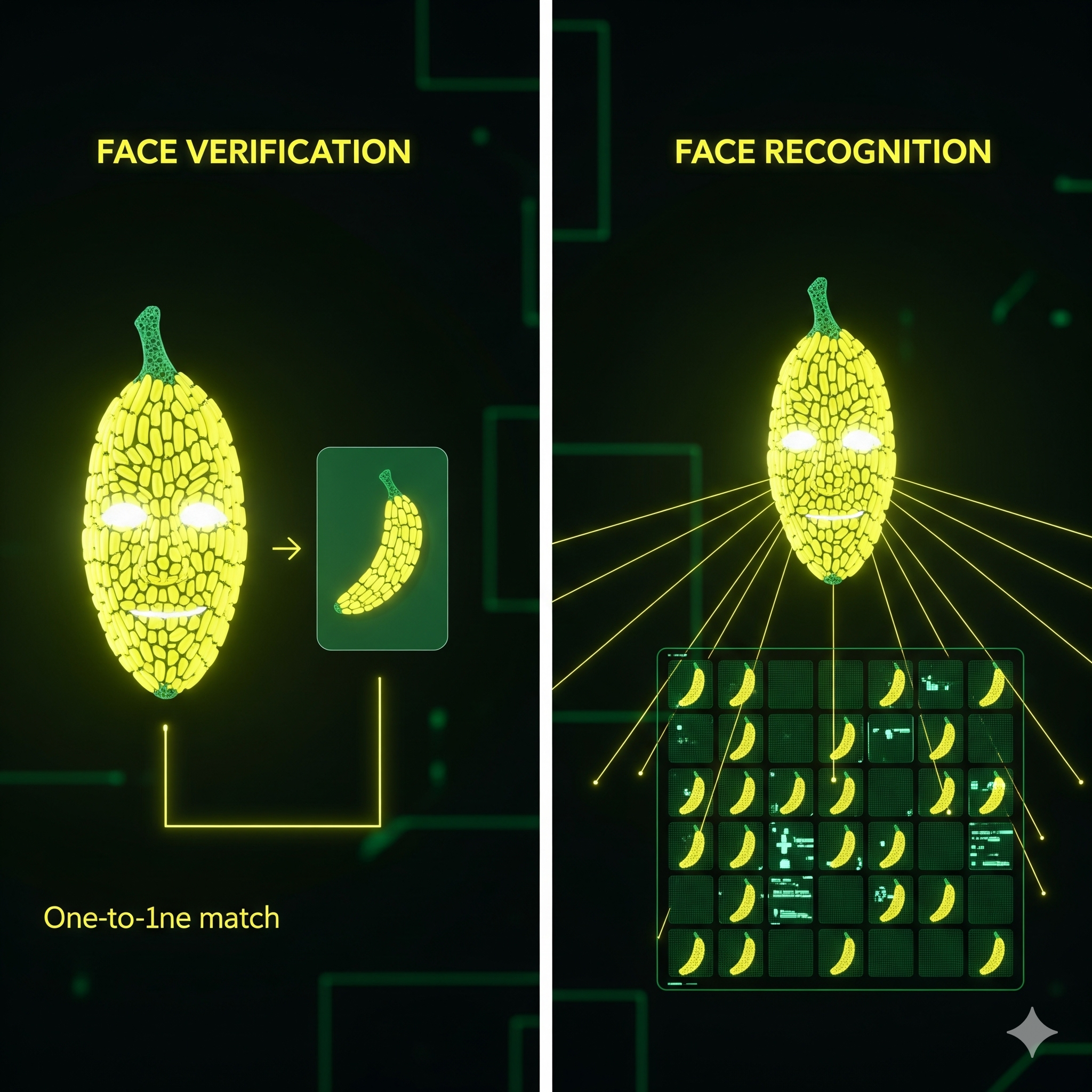
Once the face is detected, we move to Verification. This is a one-to-one (1:1) comparison.
The system is asking a specific question: "Is this person who they claim to be?"
Think of a Border Control officer at the airport. You hand them your passport (the "claimed identity"). They look at the photo in the passport, then they look at your face. They are comparing Image A (you right now) against Image B (the file on record). They aren't looking through a book of every criminal in the world; they are just checking if A == B.
When you verify a face, the system:
# Simple verification example
import face_recognition

# Load the two images
known_image = face_recognition.load_image_file("john_passport.jpg")
unknown_image = face_recognition.load_image_file("john_live.jpg")

# Get encodings
known_encoding = face_recognition.face_encodings(known_image)[0]
unknown_encoding = face_recognition.face_encodings(unknown_image)[0]

# Compare faces
results = face_recognition.compare_faces([known_encoding], unknown_encoding)

if results[0]:
    print("✅ It's the same person!")
else:
    print("❌ Not a match")
Every verification system walks a tightrope:
High-security systems (border control) set the bar high → More false rejections, but safer.
User-friendly systems (phone unlock) are more lenient → Faster but slightly less secure.
This is the heavy lifter. Face Recognition (or Identification) is a one-to-many (1:N) search.
The system captures a face and compares it against a massive database of known faces to find a match. It doesn't ask "Is this John?"; it asks "Who is this?"
Imagine a detective walking into a bar with a "Wanted" poster. They look at a patron's face, then mentally scan through their memory of hundreds of suspects to see if there is a match.
This is computationally expensive and harder to get right. As your database grows (N gets bigger), the chance of a "False Positive" (confusing two lookalikes) increases.
The math: If you have 1 million faces in your database, the system needs to:
1. Vector Databases
Instead of comparing face-by-face, modern systems use specialized databases:
These databases use clever indexing (like "Approximate Nearest Neighbor" search) to find matches in milliseconds instead of hours.
2. Clustering & Pre-filtering
Smart systems don't search the entire database:
Computers don't see noses and eyebrows; they see numbers.
When a face is processed, the AI converts it into a Vector or Embedding. This is a list of numbers (often 128, 512, or more) that represents the unique geometry of the face.
Step 1: The face is aligned (eyes leveled).
Step 2: The model maps facial landmarks (corners of eyes, tip of nose).
Step 3: These landmarks are converted into the vector.
Think of it like this:
Your Face → Neural Network → [0.23, -0.71, 0.45, 0.82, ...]
                               └─────── 512 numbers ──────┘
Each number captures something subtle about your face:
To "match" two faces, the computer simply calculates the distance between the two lists of numbers.
Common distance metrics:
# Calculating distance manually
import numpy as np

embedding1 = np.array([0.23, -0.71, 0.45, ...])  # 512 numbers
embedding2 = np.array([0.24, -0.69, 0.44, ...])  # 512 numbers

# Euclidean distance
distance = np.linalg.norm(embedding1 - embedding2)

# Cosine similarity
cosine_sim = np.dot(embedding1, embedding2) / (np.linalg.norm(embedding1) * np.linalg.norm(embedding2))

if distance < 0.6:  # Threshold depends on the model
    print("Same person!")
If you want to build this yourself, don't start from scratch. Here are the industry-standard open-source libraries and models used in 2024-2025.
The "Hello World" of face tech. Built on top of dlib. It is incredibly easy to use.
import face_recognition

unknown_image = face_recognition.load_image_file("me.jpg")
face_locations = face_recognition.face_locations(unknown_image)

print(f"Found {len(face_locations)} face(s)")
GitHub: https://github.com/ageitgey/face_recognition
⭐ Stars: 52k+
Pros: Simplest API, great documentation, works out of the box
Cons: Not the fastest, harder to deploy at scale
A lightweight wrapper for Python that supports multiple backends (VGG-Face, Google FaceNet, OpenFace, Facebook DeepFace). Great for testing different models with one line of code.
from deepface import DeepFace

result = DeepFace.verify(img1_path = "img1.jpg", img2_path = "img2.jpg")
print(result["verified"])  # True or False

# Or use it for recognition
df = DeepFace.find(img_path = "img.jpg", db_path = "my_database")
GitHub: https://github.com/serengil/deepface
⭐ Stars: 13k+
Pros: Multiple models, facial attribute analysis (age, gender, emotion), simple API
Cons: Slower than production-grade solutions
Supported models:
Built by Google. Extremely fast and lightweight. Runs smoothly on mobile devices and even in JavaScript (web browsers). Perfect for real-time applications (like Snapchat filters or basic detection).
import mediapipe as mp
import cv2

mp_face_mesh = mp.solutions.face_mesh
face_mesh = mp_face_mesh.FaceMesh()

image = cv2.imread("face.jpg")
results = face_mesh.process(cv2.cvtColor(image, cv2.COLOR_BGR2RGB))

if results.multi_face_landmarks:
    print(f"Detected {len(results.multi_face_landmarks)} face(s)")
GitHub: https://github.com/google/mediapipe
⭐ Stars: 27k+
Pros: Real-time performance, mobile-friendly, 468 facial landmarks
Cons: Not designed for recognition, mainly for detection and mesh generation
Use cases:
Currently considered one of the best open-source libraries for 2D and 3D face analysis. Uses ArcFace and RetinaFace models. Highly accurate but requires a bit more setup than the beginner libraries.
import insightface
from insightface.app import FaceAnalysis

app = FaceAnalysis()
app.prepare(ctx_id=0, det_size=(640, 640))

img = cv2.imread("test.jpg")
faces = app.get(img)

for face in faces:
    print(f"Age: {face.age}, Gender: {face.gender}")
    embedding = face.embedding  # 512-dimensional vector
GitHub: https://github.com/deepinsight/insightface
⭐ Stars: 23k+
Pros: State-of-the-art accuracy, 3D face reconstruction, age/gender/emotion analysis
Cons: Steeper learning curve, requires more computing power
Key models:
The grandfather of computer vision. Great for the "Detection" phase, but for "Recognition," you usually pair it with one of the deep learning models above.
import cv2

# Load the pre-trained Haar Cascade
face_cascade = cv2.CascadeClassifier(cv2.data.haarcascades + 'haarcascade_frontalface_default.xml')

img = cv2.imread('group_photo.jpg')
gray = cv2.cvtColor(img, cv2.COLOR_BGR2GRAY)

faces = face_cascade.detectMultiScale(gray, 1.1, 4)

for (x, y, w, h) in faces:
    cv2.rectangle(img, (x, y), (x+w, y+h), (255, 0, 0), 2)

cv2.imshow('Faces', img)
cv2.waitKey(0)
Website: https://opencv.org/
GitHub: https://github.com/opencv/opencv
⭐ Stars: 78k+
The underlying engines that run the deep learning models. If you want to train your own face recognition model from scratch, you'll use one of these.
TensorFlow: https://www.tensorflow.org/
PyTorch: https://pytorch.org/
| Library | Ease of Use | Speed | Accuracy | Production Ready | Mobile Support |
|---|---|---|---|---|---|
| face_recognition | ⭐⭐⭐⭐⭐ | ⭐⭐⭐ | ⭐⭐⭐⭐ | ⭐⭐⭐ | ⭐⭐ |
| DeepFace | ⭐⭐⭐⭐⭐ | ⭐⭐⭐ | ⭐⭐⭐⭐ | ⭐⭐⭐ | ⭐⭐ |
| MediaPipe | ⭐⭐⭐⭐ | ⭐⭐⭐⭐⭐ | ⭐⭐⭐ | ⭐⭐⭐⭐⭐ | ⭐⭐⭐⭐⭐ |
| InsightFace | ⭐⭐⭐ | ⭐⭐⭐⭐ | ⭐⭐⭐⭐⭐ | ⭐⭐⭐⭐⭐ | ⭐⭐⭐ |
| OpenCV | ⭐⭐⭐ | ⭐⭐⭐⭐ | ⭐⭐⭐ | ⭐⭐⭐⭐ | ⭐⭐⭐⭐ |
Let's build a simple but functional face recognition system that can identify your friends.
pip install face_recognition opencv-python numpy
Create a folder called known_faces/ with subfolders for each person:
known_faces/
├── john/
│   ├── john1.jpg
│   ├── john2.jpg
│   └── john3.jpg
├── sarah/
│   ├── sarah1.jpg
│   └── sarah2.jpg
└── mike/
    └── mike1.jpg
import face_recognition
import os
import cv2
import numpy as np
from pathlib import Path

class FaceRecognitionSystem:
    def __init__(self, known_faces_dir):
        self.known_encodings = []
        self.known_names = []
        self.load_known_faces(known_faces_dir)

    def load_known_faces(self, directory):
        """Load all faces from the known_faces directory"""
        print("Loading known faces...")

        for person_dir in Path(directory).iterdir():
            if person_dir.is_dir():
                person_name = person_dir.name

                for image_path in person_dir.glob("*.jpg"):
                    image = face_recognition.load_image_file(str(image_path))
                    encodings = face_recognition.face_encodings(image)

                    if encodings:
                        self.known_encodings.append(encodings[0])
                        self.known_names.append(person_name)
                        print(f"  ✓ Loaded {person_name} from {image_path.name}")

        print(f"Loaded {len(self.known_encodings)} face(s) from {len(set(self.known_names))} person(s)")

    def recognize_faces_in_image(self, image_path):
        """Recognize all faces in an image"""
        image = face_recognition.load_image_file(image_path)
        face_locations = face_recognition.face_locations(image)
        face_encodings = face_recognition.face_encodings(image, face_locations)

        # Convert to OpenCV format for drawing
        image_cv = cv2.cvtColor(image, cv2.COLOR_RGB2BGR)

        for (top, right, bottom, left), face_encoding in zip(face_locations, face_encodings):
            # Compare with known faces
            matches = face_recognition.compare_faces(self.known_encodings, face_encoding, tolerance=0.6)
            name = "Unknown"

            # Calculate distances and find the best match
            face_distances = face_recognition.face_distance(self.known_encodings, face_encoding)

            if len(face_distances) > 0:
                best_match_index = np.argmin(face_distances)
                if matches[best_match_index]:
                    name = self.known_names[best_match_index]
                    confidence = (1 - face_distances[best_match_index]) * 100
                    label = f"{name} ({confidence:.1f}%)"
                else:
                    label = "Unknown"

            # Draw rectangle and label
            cv2.rectangle(image_cv, (left, top), (right, bottom), (0, 255, 0), 2)
            cv2.rectangle(image_cv, (left, bottom - 35), (right, bottom), (0, 255, 0), cv2.FILLED)
            cv2.putText(image_cv, label, (left + 6, bottom - 6), cv2.FONT_HERSHEY_DUPLEX, 0.6, (255, 255, 255), 1)

        return image_cv

# Usage
system = FaceRecognitionSystem("known_faces/")
result_image = system.recognize_faces_in_image("group_photo.jpg")

cv2.imshow("Face Recognition", result_image)
cv2.imwrite("result.jpg", result_image)
cv2.waitKey(0)
cv2.destroyAllWindows()
Output: An image with green boxes around faces, labeled with names like "John (94.3%)" or "Unknown"
Face recognition isn't just a cool technology—it's a powerful tool that raises serious questions.
1. Surveillance & Civil Liberties
2. Bias & Discrimination
3. Data Security
4. Consent & Ownership
European Union (GDPR & AI Act)
United States (Fragmented)
China
Recommendations for Developers
Moving beyond 2D photos to true 3D depth sensing:
Post-COVID, systems have adapted:
Privacy-first approaches:
Going beyond identity:
The holy grail: Recognizing people across decades:
The arms race:
| Term | The Question | The Math | The Analogy | Output |
|---|---|---|---|---|
| Detection | "Is a face present?" | Object Detection (Bounding Box) | Counting heads on a bus | Coordinates (x, y, w, h) |
| Verification | "Is this you?" | 1:1 Comparison (Distance < Threshold) | Passport Control | True/False + Confidence |
| Recognition | "Who is this?" | 1:N Search (Find Nearest Neighbor) | Checking a Wanted Poster | Name + Confidence or "Unknown" |
face_recognition or DeepFaceInsightFace with a vector databaseMediaPipeFace recognition has gone from science fiction to everyday reality in just a decade. It unlocks our phones, tags our friends, and increasingly, watches our streets.
As developers, we have a responsibility to build these systems thoughtfully—balancing innovation with privacy, accuracy with fairness, and convenience with consent.
Whether you're building a fun app to recognize your pets or deploying a security system for a bank, remember: With great power comes great responsibility.

And also, maybe, a really cool demo that impresses your friends.
Now go forth and detect, verify, and recognize—but do it wisely.

Get the latest articles on AI, development, and more delivered to your inbox
POST COMMENT